Building and Optimizing Triggers
Introduction to Triggers
Classification of Triggers
Trigger Limitations and Use Cases
Trigger Optimization and Management
Introduction to Triggers
Triggers
A special type of Stored Procedure that is automatically executed when events like (data modifications) occur on the database server
Types of Triggers: In T-sql server there are 3 main types of triggers:
Data Manipulation Language (DML) triggers: When a user or process modififes data through an INSERT, UPDATE, or DELETE thesee triggers are associated with statements related to tables or views
Data Definition Language: fire in response to statements executed at the database or server level, like
CREATE,ALTERorDROPLogon triggers: fire in response to LOGON events when a user's session is established.
Another way to classify triggers is to classify them based on their behaviour.
Types of Trigger (based on behaviour)

A trigger can behave differently in relation to te statement that fires it, resulting in two types of triggers
AFTERTrigger: when you want to execute a piece of code after the initial statement that fires the trigger, example of this triggers: a simple use case of this type of trigger is to rebuild an index after a large insert of data into a table. another example: is using a trigger to send alerts when UPDATE statements are run againse the database. (Notify the admin when data is updated)INSTEAD OFTrigger:
will not perfome the inital opertation, but will execute custom code instead, so a replacement statement is executed instead of the original one some examples (use cases):
prevent insertions: prevent inserting data into tables,
prevent updated or deletion.
Prevent object modification.
and you can also notify the database administrarotr of suspicous behaviour while also preventing any changes
Trigger Definition
because trigger is a sql server object, we add a new one by using the CREATE statement.
General Syntax
You should give the trigger a descriptive name For example an trigger created with AFTER
(with INSTEAD OF)
any attempt to remove rows from the table will fail due the use of INSTEAD OF
Practical Example\
Practicing creating triggers * The Fresh Fruit Delivery company needs help creating a new trigger called OrdersUpdatedRows on the Orders table.
This trigger will be responsible for filling in a historical table (OrdersUpdate) where information about the updated rows is kept.
A historical table is often used in practice to store information that has been altered in the original table. In this example, changes to orders will be saved into OrdersUpdate to be used by the company for auditing purposes.

How DML Triggers are used
Initiating actions when manipulating data: the main reason for using DML triggers is to initiate actions when manipulating data
preventing data manipulation: and sometimes the manipulation of data needs to be prevented, and this can also be done with the use of trigger
Tracking data or database object changes: another powerful use case often seen in practice is using the triggers for tracking data change and even database object changes
User auditing and database security: database admins also use triggers to track user action unwanted changes and to secure the database by protecting it from
How to decide between AFTER and INSTEAD OF? each one of them has certain use cases, so depending the on use case your choice will be fair AFTER: one good example of using AFTER trigger is for a large insert of data into a sales table, once the data gets inserted, a cleaning step should run to remove or repaint any unwanted information when the cleansing step finished, a report with the results will be generated, this report should be anaylzed by a database adminstrator so the trigger will then send an email to the responsible people.
INSTEAD OF a good use case:
Imagine you have a table containing light bulb information and stock details for a sales platform
x
Standford
30W
30
y
Buma
40W
0
z
Ultra
50W
0
the "Power" column values have changed for some models, and an update is initiated to change the information in the table but there are still some bulb models in stock that have the old power value, however, and they shouldn't be updated so Instead of trigger can help you deal with this more complex situation the correct approach is to update the characterstics only for the models that don't have old version in stock; the new models need to be in the table too, but as new rows instead of updated ones
Power changes from some models
Update only the products with not stock.
Add new rows for the products with stock
the new modes need to be in the table too, but as new rows instead of updated ones.
x
Standford
30W
30
y
Buma
40W
100
z
Ultra
50W
100
x
Standford
35w
100
Practical Example
Trigger Alternative
Trigger are great, but they are not the only solution in SQL server So we will discuss some alternatives
Triggers vs Stored Procedures Triggers as you know are special kind of Stored Procedure, but what makes them "Special"? Triggers are fired automatically by an event
In opposite direction, SP run only when called explicitly
Triggers:
don't allow parameters or transactions.
can't return values as output; SP : Accept input parameters and transcations can return values as output so these differences enforce some use cases for each one of them
Triggers used for:
auditing
Integrity enforcement
SP used for:
general tasks
user-specific needs
the second comparison is with Computed Columns Triggers v Computed columns Computed Columns: are a good way to automate the calculation of the values contained by some columns. Triggers:
use columns from other tables for calculations Computed Columns:
use columns only from the same table for calculations
while this calculation will be done with INSERT or UPDATE statments when using a trigger,
for a computed column it will be part of the table definition
Example of Computed Column As you see in the definintion of SalesWithPrice, the 'TotalAmount' table value comes from the mutliplication of the 'Quantity' and 'price' column from the same table
But if those two columns are on other tables, we can't use Computed Columns, we use trigger instead the Price column is not part of the 'SalesWitoutPrice' table
Classifications of Triggers in Depth (DML)
AFTER TRIGGERs
After trigger can be used for both DML and DDL statment we'll be focusing on DML AFTER triggers the trigger will be fired ""AFTER" the event finish executing not at the beginning of the event
AFTER Trigger prerequisites:
Table or view needed for DML statements
The Trigger will be attached to the same table so we we need: [1] Target [2] Description of the trigger: what you are tryint to achieve with the trigger let's take an example: in this example we want to keep some details of products that are not sold anymore, these products will be removed from the Product table, but their details will be kept in a 'ReturedProducts' table for financial accounting reasons so out trigger will save information about deleted rows (from product table) to the 'RetiredProduct' table the trugger should hae a uniquely identify name for our example it will be 'TrackRetiredProducts' wheneveer rows are deleteed form the 'Products' table the deleted rows' information will be saved to to the 'RetiredProducts'
notice that we are not getting the information from the 'Products' table, but from a table alled' deleted'
"insterted" and "deleted"tables
these tables are automatically created by SQL server and you can make use of them in your trigger actions. Depending on the operation you are performing, they will hold different inormation
[1] Inserted table this table will store the values of the new rows for "INSERT" and "UPDATE" statements
inserted
new rows
new rows
N/A
deleted
N/A
updated rows
removed rows
[2] deleted table: will store the value of modified rows for update statement, or the value of removed rows for 'DELETE' statment
time for exercise
To ensure
Practicing with AFTER triggers Fresh Fruit Delivery company is happy with your services, and they've decided to keep working with you.
You have been given the task to create new triggers on some tables, with the following requirements:
[1] Keep track of canceled orders (rows deleted from the Orders table). Their details will be kept in the table CanceledOrders upon removal.
[2] Keep track of discount changes in the table Discounts. Both the old and the new values will be copied to the DiscountsHistory table.
[3] Send an email to the Sales team via the SendEmailtoSales stored procedure when a new order is placed.
INSTEAD OF Trigger
in contrast with AFTER triggers, INSERT OF triggers can only be used for DML statements (not DDL)
the actions are performerd instead of the DML event
The DML event does not run anymore
let's take an example our example is a table Orders which holds the details of the orders placed by the Fresh Fruit Delivery Company's customer <img src"#" alt="Table of Orders> as we discussed before, you should keep on mind some steps to know exactly what your trigger will be doing. [1] Target Table -> Orders [2] Description of the trigger -> the trigger we will create should prevent updates to the existing entries in this table, this will ensure that placed orders cannot be modified, this is a rule enforced by the company, this means our trigger will fire as a response to UPDATE statements [3] Trigger firing event (DML) -> UPDATE [4] Trigger Name -> PreventOrdersUpdate (having an infomarie name is important when creating triggers) let's create the triggers
Attempting to UPDATE will throw an error
DDL Triggers
Only used with AFTER
and attached to only database or server level
no special tables
AFTER and FOR
the FOR and AFTER have the same results
Developers tend to use AFTER for DML triggers and FOR keyword for DDL triggers
DDL Trigger preprequisites
[1] Target Object (server or database) =>DATABASe [2] Description of the trigger => Log table with definition changes [3] Trigger firing events (DDL) => CREATE_TABLE, ALTER_TABLE, DROP_TABLE [4] Trigger Name => TrackTableChanges
EVENTDATA() function: holds information about the event that runs and fires the trigger
Preventing the triggering event for DML triggers
we've discussed before that we can't use INSTEAD OF with DDL Triggers!! this means we don't have a solution around this if we want to do similar thing with DDL triggers? The Answer is No, we have we can defone a trigger to roll back the statements that fired it
LOGON Triggers
are fired when a user logs on and creates a connection to a SQL server. the trigger is fired after the authentication phase (meaning after the username and password are checked), BUT before the user session is established (when the information from SQL Server becomes available for queries)
Logon trigger prerequisites
logon trigger can only be attached at the server level, and the firing event can only be LOGON
[1] Trigger firing event -> LOGON [2] Description of the trigger -> Audit successful / failed logons to the server [3] Trigger name -> LogonAudit the trigger will be executed nder the same credentials (username and password) as the firing event.
'sa' is a built-in adminstrator account tht has the full permissions on the server, because regular users don't have sensitive information like logon details
@@SIPD => the id of the current user
some exercises
Trigger limitation and use cases
Let's begin by discussing some of the advantages of using Triggers:
Used for Database Integrity purposes
We can enforce business rules and store it directly in the databases, this makes it easier to change and update the applications that are using the database, because the buisness login is encapsulated inside the database itself
Triggers give us control over which statements are allowed in a database
Implementation of complex business logic triggered by a single event
Auditing the database and user activites
now let's see what the cons are:
Triggers are not easy to manage in centralized manner, because they are difficult to be detected or viewed
they are invisible to client application or when debugging code
because of their complex code, we can't sometime trace their logic when troubleshooting
They can affect the server and make it slower by overusing them
Finding the server-level trigger
From all those pros and cons, we can conclude that we should document our triggers and make them as simpler as we can. Because Triggers can be implemented on many levels (system, database, tables, etc) SQL Server gave us a way to view that information about triggers in one place
[1] Getting system level triggers
[2] Getting the datatabase and table triggers
Trigger type and definition
**The type of the trigger (database or table) can be determined from the 'parent_class_desc' column ** We can view triggers definition graphically using MS management studio: head over to the Triggers folder and right-click on the trigger name and choose 'Script Trigger as -> CREATE TO -> New Query Edit Window' ** SQL system views are like virtual tables in the database, helping to reach the information that cannot be reached otherwise
** We can also use the OBJECT_DEFINITION() function and pass it the id of the trigger
** the last option we can use to use 'sp_helptext' procedure, which uses a parameter called 'objname'
but this option is not the most common one, it's rarely used
Triggers best practice
Make sure your database is well-documented
keep your trigger logic simple
avoid overusing triggers
time to practice
using OBJECT_DEFINITION
Use cases for AFTER triggers (DML)
A common use for AFTER triggers is to store historical data in other tables (Having a history of changes performed on a table) ** Best practice: Keep an overview of the changes for the most important tables in your database
For example, let's say the customer in Customers table change his phone number, so we keep this change as well as the the old phone number on the 'CustomersHistory' table
The previous table is obtained using a **AFTER** Trigger
Table auditing using triggers
Another major use of AFTER triggers is to audit changes occurring in the database Auditing means: Tracking any changes that occur within the defined scope usually, the scope of the audit is comprised of very important tables from the database In the following query, we create a trigger called 'OrderAudit' that keep track of any changes occur to the 'Orders Table' it wil fire for any DML statements, inside the trigger we've two Boolean variables that will check the special tables "inserted" and "deleted", when on of the special tables contains data, the associated variables will set to "true" the combination of variables will tell us of the operation is an INSERT, UPDATE, or DELETE these changes will be kept inside 'TablesAudit' Table
Another use case is 'Notifying users': which means we can send notification to different users using triggers most of the notifications will be about events happening in the database In this query, the Sales department must be notified when new orders are placed The stored procedure will be executed when an INSERT query happens
time to practice
Copy Customer changes to History table
Keep track of any modifications made to the contents of Orders
Uses cases for INSTEAD OF Trigger (DML)
Preventing certain operation from happening
Enforcing data integrity
Control the database statements
An example of trigger that prevent and notify admin
Let's say we don't want the regular users to make certain opertation on the database tables [like updating or deleting] and when they make so, we send the admin a notification
Triggers with conditional logic
Triggers are not just limited to the prevention of operations, we can also use it to decide whether or not some of operations should succeed
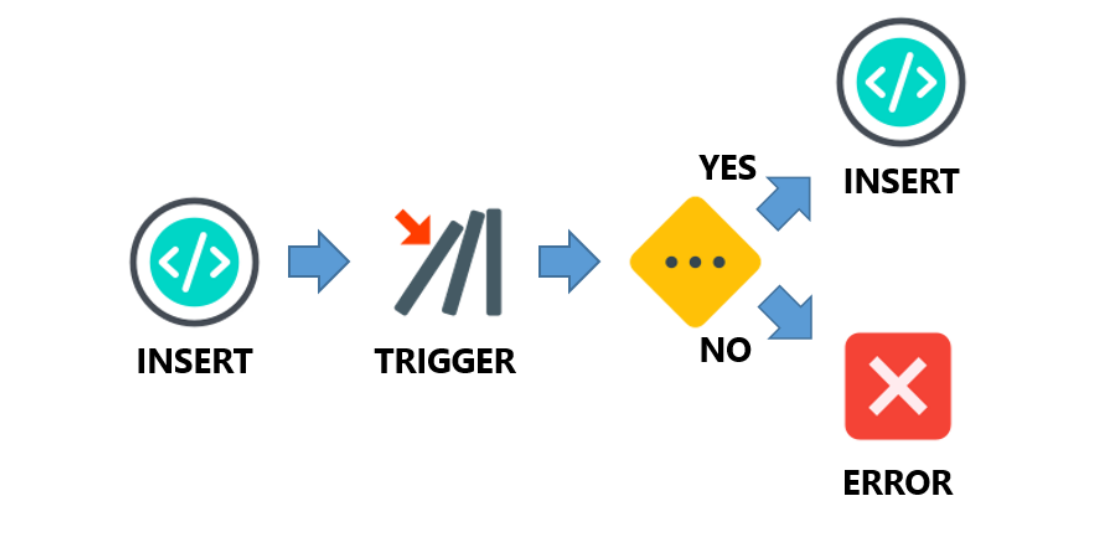
here we prevent inserting any new orders when there is not sufficient stock of the product
time for practice
Use cases for DDL Triggers
As you know DDL Triggers can be created at different levels (Database level ,Server level) [1] Database Level A trigger created at the database level can respond to statement related to tables, view interactions, and index management, as well as more specific statements to do with premissions management or statistics
CREATE_TABLE, ALTER_TABLE, DROP_TABLECREATE_VIEW, ALTER_VIEW, DROP_VIEWCREATE_INDEX, ALTER_INDEX, DROP_INDEx
[2] Server Level
at the server level, the trigger used can respond to database management and controlling server permissions and the use of credentials
CREATE_DATEBASE, ALTER_DATABASe, DROP_DATEBASEGRANT_SERVER, DENY_SERVER, REVOKE_SERVERCREATE_CREDENTIAL, ALTER_CREDENTIAL, DROP_CREDENTIAL
check the online documentaion for the full list of DDL
Databasse auditing
we can keep track of the changes at the database level
Table of contents
Trigger Management and Optimization
Trigger Modifications
Because triggers are objects we can deal with them as we deal with any DB object by deleting or creating and so on.
Deleting A trigger on a table or view
Disabling a trigger
Deleting triggers
Deleting table and view triggers
Deleting database level triggers
Deleting server triggers
Disabling triggers
There are some cases when you need just to stop trigger for specific period of time AKA **Disabling" a trigger.
A deleted trigger can never be used again, unless you recreate the trigger.
📘 note
When you need to disable a trigger, you need to explicitly specify the object the trigger is attached to, even if it is a normal table.
Re-enabling triggers
Altering triggers
there are two main approaches for changing triggers after they were created
Create and Drop workflow
using
ALTER
In the first approach, you're going to create the trigger and if something happened and you wish to change it, you DROP the trigger and re-create it. which is something frustrating during development, instead you can ALTER the trigger in time
Trigger Management
To get information about the current triggers you've on your server, we'll explore the sys.triggers table which contains information about the system triggers
this table contains about 13 attributes, but we are going to explore the most important ones.
name
trigger name
object_id
unique identifier of the trigger
parent_class
trigger type - 1 for table trigger - 0 for database trigger
parent_class_desc
textual describe of trigger type
parent_id
unique identifier of the parent object that trigger is attached to
create_date
date of creation
modify_date
date of last modifications
is_disabled
current state
is_instead_of_trigger
INSTEAD OF or AFTER trigger
If you want to know the sever level triggers
the table will have the same structure as the databsase triggers level with the same information
What if you need to identify the events that will fire a trigger ?
this information is stored in sys.trigger_events
you don't need to memorize all of the events that will fire the triggers, they are contained in sys.trigger_event_types
the problem here is that the information is divided into many tables, if you want to form a good answer
"list the trigger along with their firing events and object they're attatched to" we need to join the tables together
note: the second join is chosedn to be a LEFT join beause database-level triggers do not appear as attached to an object
In real-world you'll not use those views in isolation, they usually combined together to get a useful information
Practice Time
troubleshooting Triggers
Keep a history of triggers runs
how to search for triggeers causing issues
Tracking Trigger Exectuins (system views)
one important thing to keep on mind when troubleshooting triggers is to have a history of their execution
note: SQL Server provides information on the execution of the triggers that are currently stored in memory, so when the triggers are removed from memory they areremoved from the view as well sys.dm_exec_trigger_stats
so how to get around this problem? by creating our custom solution
This will raise an error, but also we got a **permenant record that we can use to track the history of triggers runs
How can we identify the triggers on a certain table or view? using sys.objects table which contains information about the objects on the database.
Products
123
Then
To identify the events capable of firing a trigger, we'lljoin to the sys.trigger_events also
if we want to further view also the trigger definiton, we'll use OBJECT_DEFINITION() method which return the definintion for an object Id passed as an argument
now you can inspect and modify the trigger definintion if needed
Practice Time
Use Case For DDL Triggers
where the trigger is created will influence the types of statements able to fire it
Database Auditing
Preventing server changes
Resources
Last updated